
We Need to Talk About Open/Exposed Ports
By Zoe Montague · · 20 min read
- Cybersecurity
- Network Security
- Risk Assessment
- Technical Analysis

There is a disturbing amount of devices that are connected to the internet and have ports open to the world that should not be open. We are at a time where the world is the most connected it has ever been.
You can jump on the internet and play a game with someone from the opposite site of the world. You can watch a YouTube series that was made in a small town in Ontario, Canada while on a boat in the middle of the ocean. You can meet people online that you relate to or have common interests with, even though you may live in an area that isn’t friendly to who you are.
This makes me think of a song called “Welcome to the Internet” by Bo Burnham from his musical/documentary “Inside”: “Could I interest you in everything? All of the time? A little bit of everything, all of the time”
What Are Ports?
Non-Technical Explanation
Imagine your computer is like a large office building. Each room in the building has a specific function, like a bedroom, a kitchen, or an office. Ports are like the doors to these rooms. They allow different types of communication to happen between your computer and other devices.
For example, one door might be for sending emails, another for browsing the internet, and another for printing documents. When these doors (ports) are left open, anyone can potentially walk in and access the room, which can be risky if not properly managed.
Technical Explanation
A port is a logical construct that identifies a specific process or type of network service. Ports are used by the Transport Layer protocols TCP (Transmission Control Protocol) and UDP (User Datagram Protocol) to direct packets to the appropriate application or service running on a device.
HTTP (Port 80): The foundation of data communication on the web
HTTPS/SSL (Port 443): Secure version of HTTP with encryption. Also commonly used for encrypted VPN traffic
SMTP (Port 25): Simple Mail Transfer Protocol for sending emails
SMB (Port 445): Server Message Block for file sharing. Used by Windows PCs, NAS devices, and printers
RDP (Port 3389): Remote Desktop Protocol for remote access to Windows computers
SSH (Port 22): Secure Shell for secure remote login to Linux devices, networking equipment, and IoT devices
Risks Associated with Open/Exposed Ports
Now that I’ve explained what a port is, and given some examples of what types of services and what ports they use, why is it an issue if some of these are open to the internet? Let me breakdown some of the ways these open ports could be exploited.
Unauthorized Access
Open ports can serve as entry points for hackers to infiltrate your network. For example, an open RDP (port 3389) can allow attackers to gain remote access to a computer, potentially leading to unauthorized control and data theft.
Malware Infections
Exposed ports increase the likelihood of malware entering your network. For example, SMB (port 445) was exploited by the WannaCry ransomware to spread across networks, causing widespread disruption.
Denial of Service (DoS) Attacks
Attackers can target open ports to overwhelm your network with traffic, rendering it unavailable to legitimate users. An open HTTP (port 80) can be used to launch DoS attacks on web servers.
Data Exfiltration
If an attacker gains access through an open port, they can easily exfiltrate sensitive data without your knowledge. An open SMTP (port 25) can be exploited to send out large volumes of sensitive information via email.
Increased Attack Surface
Every open port expands the attack surface of your network, increasing the chances of a breach. Reducing the number of open ports minimizes potential entry points for attackers.
Case Studies, Examples, and Statistics
Shodan is a search engine that scans the internet for connected devices and services. Unlike traditional search engines that index web pages, Shodan indexes information about devices such as desktops, laptops, servers, network devices, and more. It collects data on open ports, services running on those ports, and various other details about the devices it finds.
Using Shodan, I have gathered statistics on open ports to illustrate the prevalence and risks associated with exposed ports.
Heartbleed Vulnerability (April 2014)
The Heartbleed bug was a critical vulnerability in the OpenSSL cryptographic software library, discovered in April 2014. It allowed attackers to read sensitive data from the memory of affected servers, including usernames, passwords, and private keys.
17% of all SSL servers affected at discovery
11/10 severity rating by security expert Bruce Schneier
WannaCry (May 2017)
The WannaCry ransomware attack was a significant global cyberattack that occurred in May 2017. It targeted computers running the Microsoft Windows operating system by encrypting data and demanding ransom payments in Bitcoin. The attack spread using an exploit called EternalBlue, which targeted an exploit in SMB on port 445.
200,000+ systems affected globally
150+ countries impacted
$Billions in estimated damages
Maritime Cybersecurity Incident (April 2024)
In April 2024, a coordinated cyberattack targeted several key maritime ports and vessels worldwide, causing widespread disruption. The attackers exploited vulnerabilities in the Automatic Identification Systems (AIS), which often have open ports for communication.
1,800+ vessels targeted
$500M+ in financial losses
$3.2M average ransom demand
IoT Device Exploitation (May 2024)
In May 2024, Microsoft uncovered a significant cyberattack targeting internet-facing IoT devices and Linux-based systems. The attackers leveraged custom and open source tools to exploit open ports, particularly SSH (port 22), to gain unauthorized access and deploy malicious software.
136% increase in IoT vulnerabilities from previous year
Statistics from Shodan Research
Using Shodan, I gathered data on the prevalence of open ports across various devices connected to the internet. These numbers can only indicate how many devices Shodan has found with these ports, so we cannot use these as definite numbers. These numbers could be higher, we just don’t have proof of that.
Remote Desktop Protocol (Port 3389)
3,454,773 instances
Top 5 Countries:
- United States: 986,492
- China: 885,012
- Singapore: 210,271
- Germany: 181,166
- United Kingdom: 107,941
Server Message Block (Port 445)
1,496,708 instances
Top 5 Countries:
- United States: 600,158
- Pakistan: 90,225
- Russia: 71,899
- Hong Kong: 70,232
- Germany: 70,122
209,083 instances with authentication disabled
178,264 running insecure SMB version 1
Example Shodan search results showing SMBv1 with authentication disabled:
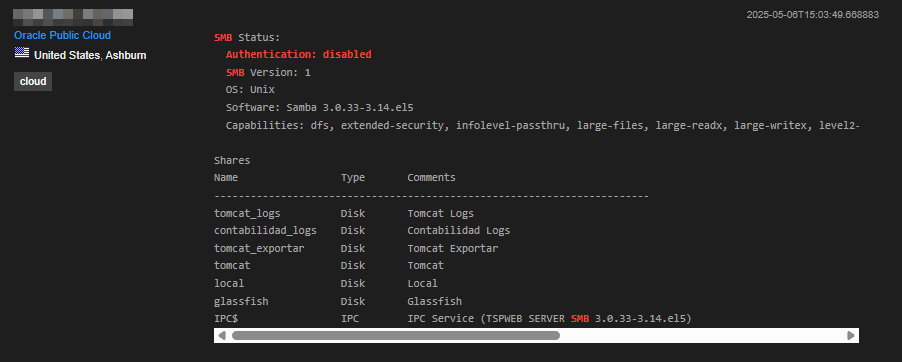
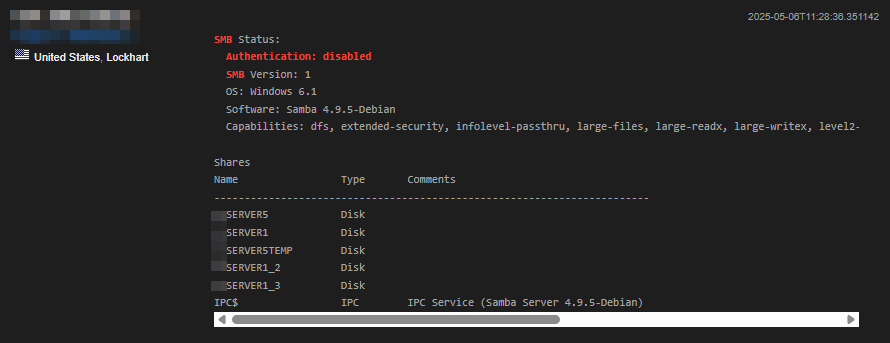
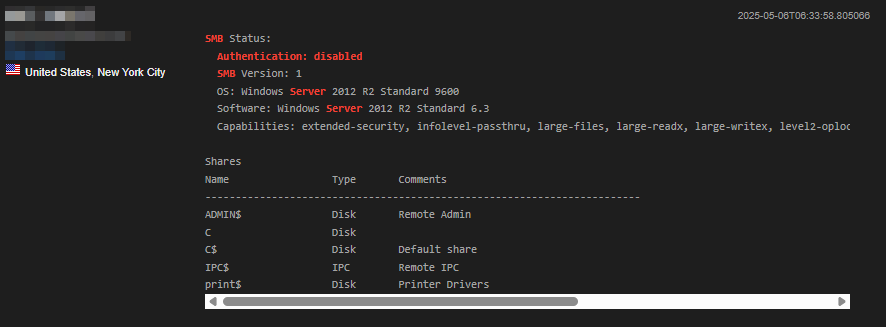
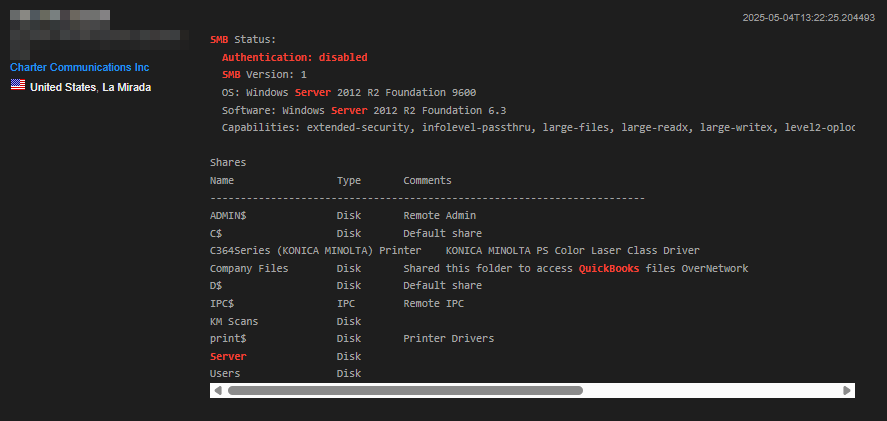
These screenshots show real devices found on Shodan with SMBv1 and disabled authentication - a critical security vulnerability that leaves systems wide open to attack. Click any image to enlarge.
Geographic Distribution
977,890 Kansas City
224,092 Mountain View
101,959 Redwood City
91,010 San Jose
Regional distribution of exposed ports:
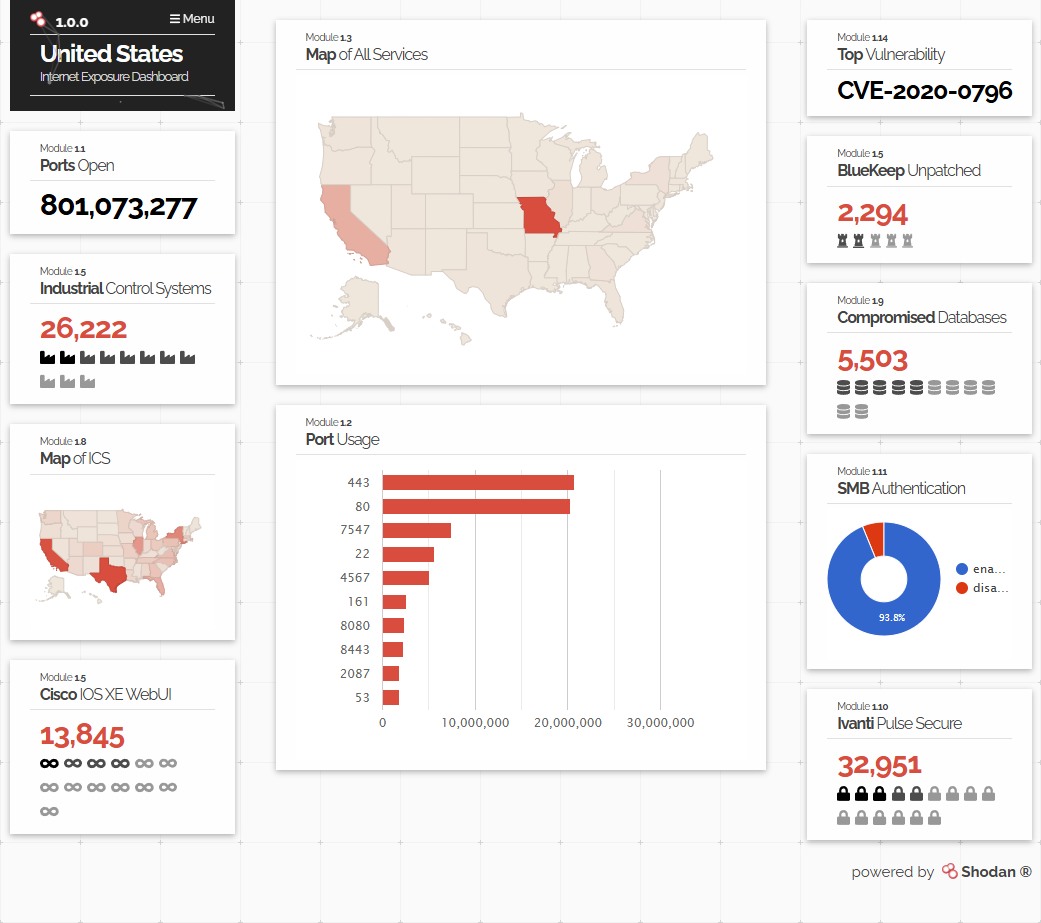
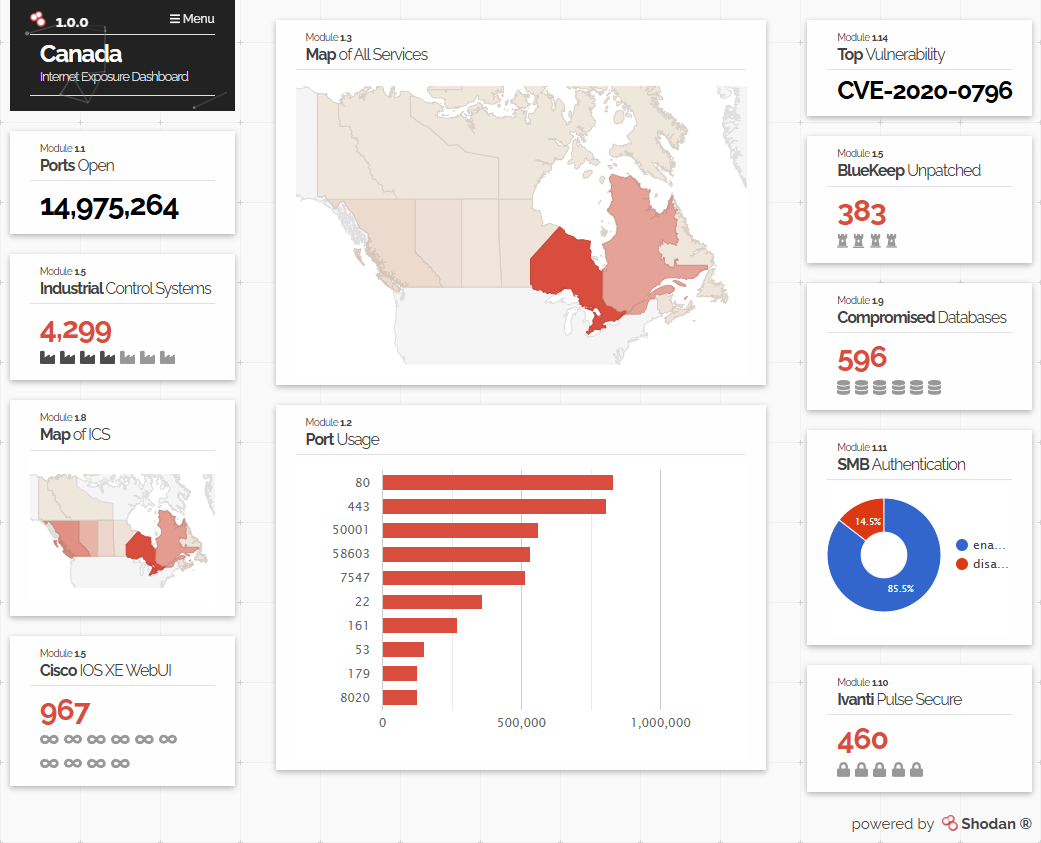
Real-World Exposure Examples
The following images demonstrate actual exposed devices found through Shodan, including firewall login interfaces and security cameras with public access. These represent real security vulnerabilities that could be exploited by malicious actors.
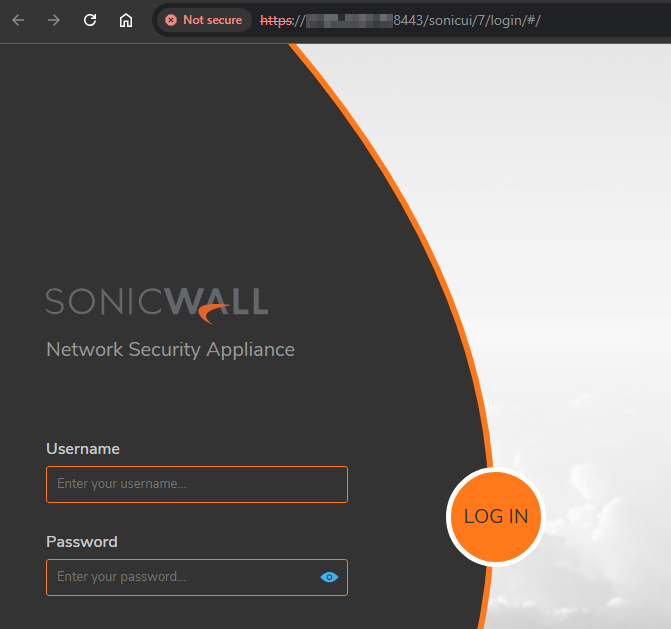

These examples illustrate how critical infrastructure can be inadvertently exposed to the internet, creating significant security risks. Click images to see full details.
Organizations with Most Open Ports
- Google LLC 1,195,911
- Incapsula Inc 106,219
- Microsoft Corporation 71,733
- Amazon Technologies Inc 18,919
Note: Microsoft and Amazon numbers include Azure and AWS services deployed by businesses, meaning many individual businesses should be on this list but aren’t due to platform ownership.
Common Vulnerabilities Found
SMBv3 Remote Code Execution (CVE-2020-0796)
40,851 vulnerable instances
BlueKeep 2,398 vulnerable instances in RDP
EternalBlue 330 vulnerable instances in SMB
Common Tags & Risk Indicators
1,128,386 Cloud-hosted instances with exposed ports
51,075 Devices running end-of-life operating systems
Top Operating Systems with Open Ports
- Windows Server 2022 121,576
- Windows 10 (build 17763) 88,993
- Windows Server 2012 R2 (EOL) 63,699
Conclusion
Open ports on internet-connected devices present significant security risks that cannot be ignored. As we have seen through various case studies and statistics, these vulnerabilities can lead to unauthorized access, malware infections, denial of service attacks, data exfiltration, and compromised devices.
High-profile incidents like the WannaCry ransomware attack, the Heartbleed vulnerability, the IoT device exploitation, and the Maritime Cybersecurity Incident highlight the critical need for increased security measures.
By understanding the nature of ports and the risks associated with leaving them exposed, IT professionals and organizations can take proactive steps to secure their networks. Regular port scanning, proper firewall configuration, timely patch management, and network segmentation are essential practices to mitigate these risks.
The data gathered from Shodan underscores the prevalence of open ports and the potential vulnerabilities they introduce. With millions of devices exposed, it is imperative to prioritize cybersecurity and protect against potential threats.
As technology continues to evolve, so too must our approach to cybersecurity. It is crucial to stay informed and vigilant, ensuring that our devices and networks are safeguarded against potential threats.
If you have any questions, need assistance, or want to schedule a security assessment, feel free to reach out.
Stay safe and secure!